Librevet for manufacturers
Be in the plan, not just in the catalogue
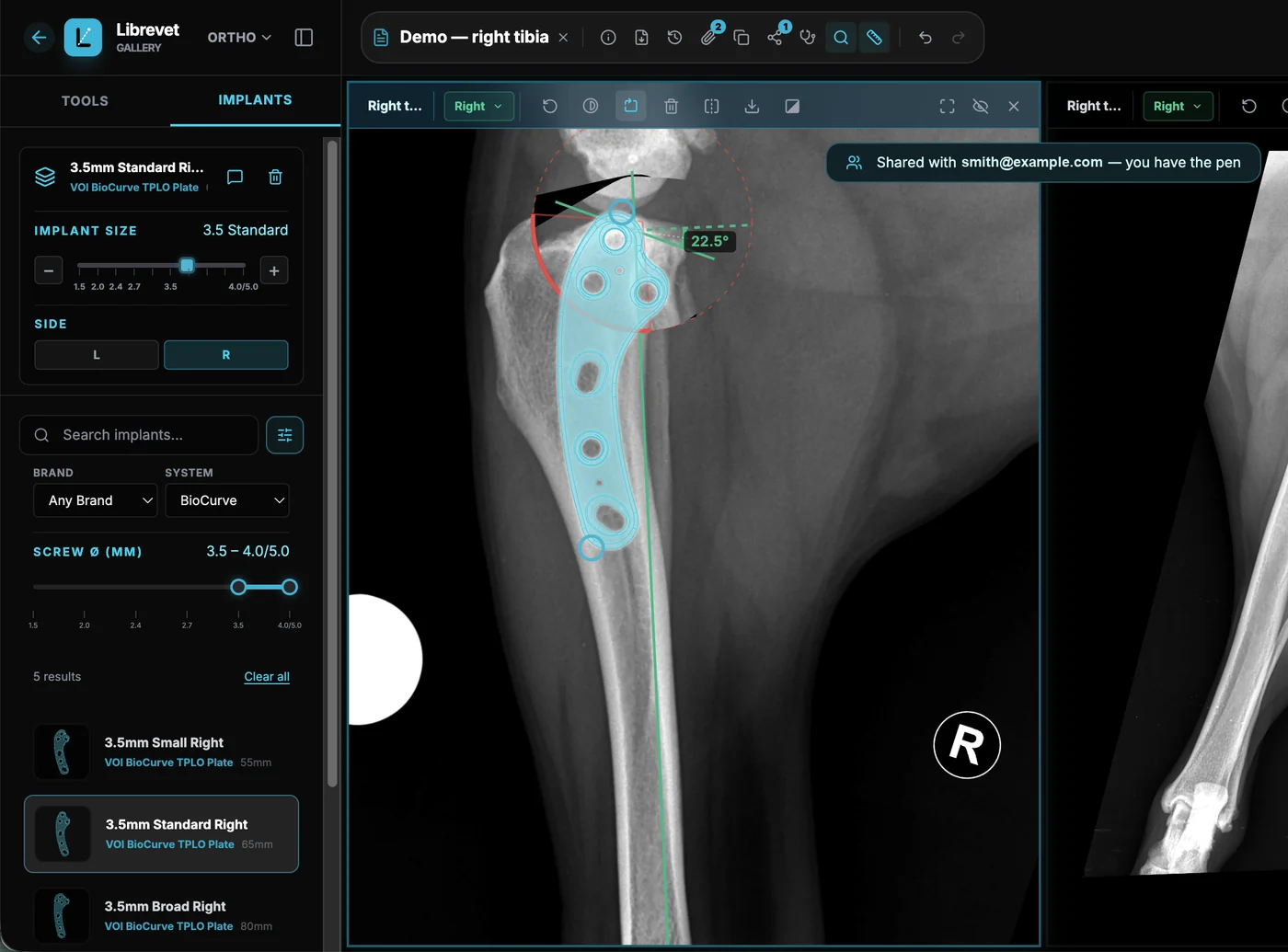
Surgeons choose the implant while they plan the surgery, days before anybody places an order. Librevet puts your templates in that moment — at true scale, on the surgeon's own radiograph.
The implant is chosen before theatre
A surgeon planning a TPLO decides the plate, the size and the screw pattern at the planning stage — sitting at a screen, days ahead, weighing what fits. By the time anyone opens a box, the decision is old.
Librevet is where that decision happens. Being in the library means being one of the options on the radiograph at the moment it is made, at the right size, next to everybody else's.
And the plan is not a side tool. It leaves Librevet as a Surgical Plan Report PDF — the patient, the measurements, the osteotomy and the implants placed — so your template ends up in the document that sits in the patient file.
What you get
A portal of your own, run by your people, on your schedule.
Your library, managed by your people
The people who look after your implant range get their own portal, scoped to your brand and nobody else's. They draft a template, submit it, and it goes live once we have checked it against the specifications you supplied. No tickets, no waiting on us to type it in for you.
- ✓ Draft, submit, revise, and pull a submission back before it publishes
- ✓ Bulk-load a range from a spreadsheet or a ZIP of drawings
- ✓ Every change reviewed before it reaches a surgeon
Control who sees what, and when
Not every plate should be visible to every surgeon on day one. Templates can be public or scheduled to appear on a launch date — and on Insights and above, restricted to named vets, or opened to a beta group first and to everyone later.
- ✓ Restrict a template to named clinics or a trial group, on Insights and above
- ✓ Schedule a release so it appears the morning of the launch
- ✓ Open a beta template to everybody on a date you set
Sponsor your customers
Buy a pool of licence seats and hand them out to the clinics you look after. The vet signs in and finds your library waiting for them — a reason to keep the relationship, delivered through the tool they already use to plan.
- ✓ Assign seats in bulk, by email address
- ✓ A seat waits for a vet who has not signed up yet
- ✓ Unassigned seats stay in your pool until you use them
See what actually gets planned
Which of your implants surgeons place on a plan, and how that moves month to month. To be exact about what this is: it counts template placements made during planning, not confirmed purchases and not implantations. It is still a number you cannot get from a sales report, and it arrives earlier.
- ✓ Template placements per template, per month
- ✓ How many distinct surgeons, not just how many clicks
- ✓ Nothing below five distinct surgeons is ever shown
Inside the portal
Not a mock-up — this is the portal, with a demo brand's library in it.
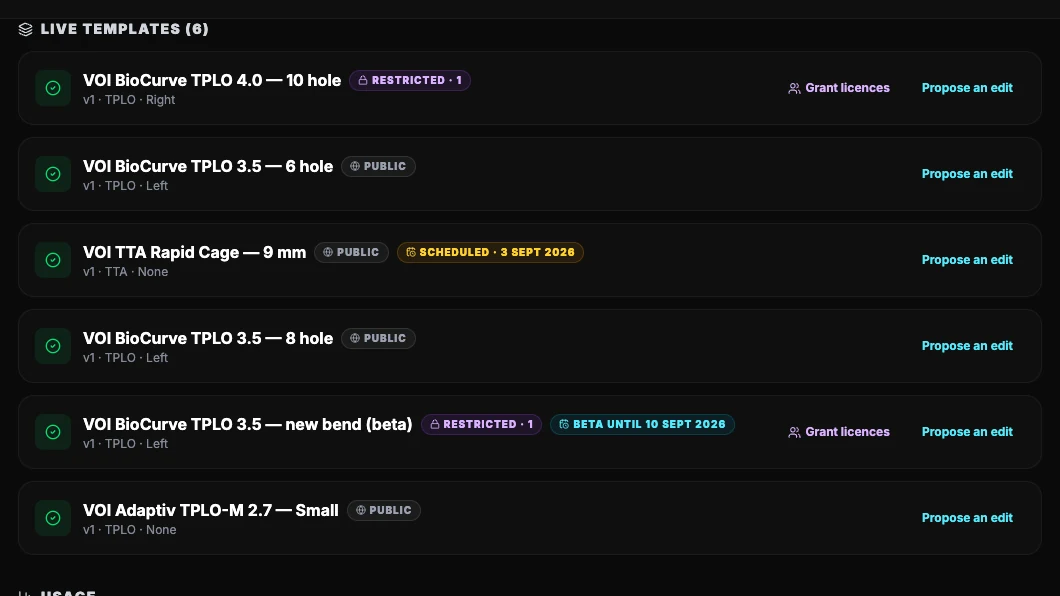
Your library, your states
Public, restricted to named clinics, scheduled for a launch date, or open to a beta group first — all of it set by your own team.
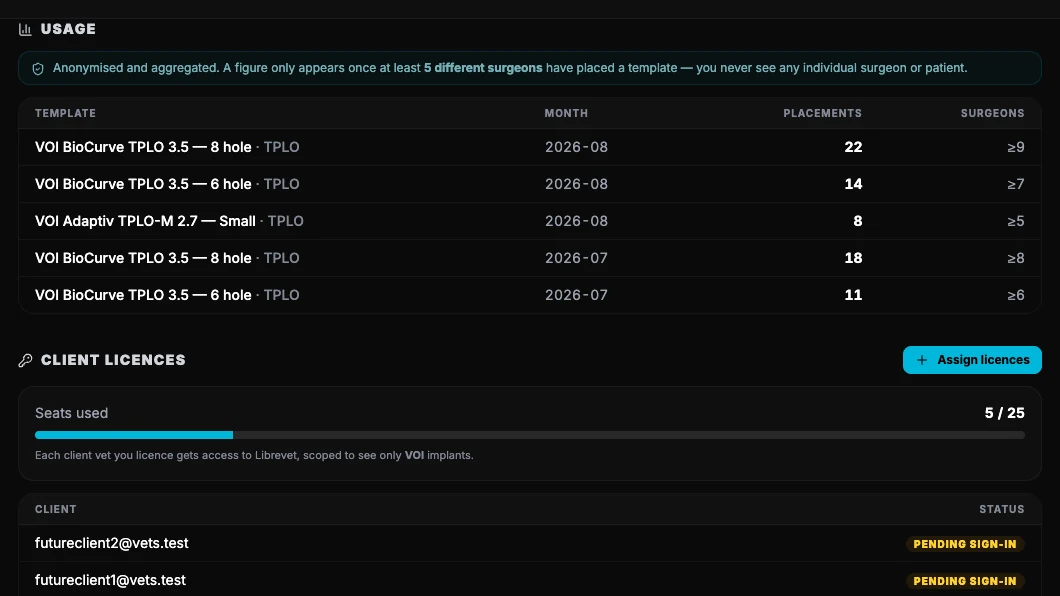
What actually gets planned
Placements per template per month, and how many distinct surgeons. Nothing appears until at least five of them have used it.
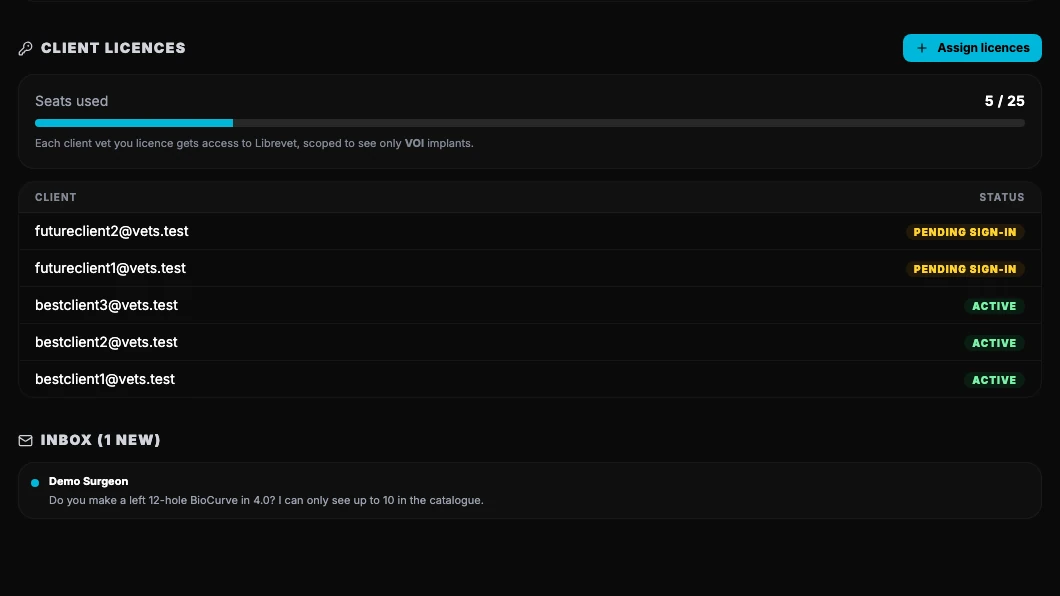
Seats you hand out
Buy a pool, assign seats by email — a seat waits for a vet who has not signed up yet. Underneath, your inbox: a question from a surgeon lands here and your team answers it here. The email telling you one has arrived carries none of what they wrote.
What stays out of your portal
Surgeons put real cases into Librevet. The limits below are what make the usage data acceptable to them — and therefore what makes it exist at all.
Anonymised, and enforced rather than promised
Usage is aggregated into monthly buckets per template. A bucket touched by fewer than five distinct surgeons is not returned at all — that floor lives in the database's own access rules, not in a report we generate, so it holds in every manufacturer's portal.
No patient records
No case, no radiograph and no patient record reaches your portal. What a surgeon chooses to share with a colleague or send to a specialist stays inside Librevet and is invisible to you. From the planning itself, your portal shows monthly counts of your own templates, and nothing else.
Your brand only
Your team sees your brands and nothing else — not another manufacturer's templates, drafts, usage or licences. And no other manufacturer's team can see yours.
Plans
Start on Catalogue at no cost. Insights adds anonymised usage of your implants, Partner adds announcements of your new additions to surgeons, and Enterprise puts the planner under your own brand.
Catalogue
Free
no cost
Build your presence
Insights
US$100
a month
See what gets planned
Partner
US$500
a month
Promote and accelerate
Enterprise
Per seat
US$1,500 a month minimum
White-labelYour app, your brand
Scroll the table sideways to compare.
| Included | Catalogue | Insights | Partner | Enterprise |
|---|---|---|---|---|
| Catalogue and reach | ||||
| Implant listings | Up to 100 | Up to 500 | Unlimited | Unlimited |
| Catalogue management | Included | Included | Included | Included |
| Limit implants to named vets or a trial group | Not included | Included | Included | Included |
| Portal access | Catalogue only | + Analytics | + Analytics | Full admin |
| Insight and visibility | ||||
| Usage statistics | Not included | Anonymised | Anonymised | Your app's users only |
| New additions announced to surgeons | Not included | Not included | Included | Included |
| Brand and integration | ||||
| White-label, branded experience | Not included | Not included | Not included | Included |
| Integrated into your own website | Not included | Not included | Not included | Included |
| Admin capability | Not included | Not included | Not included | Included |
| Support | ||||
| Dedicated support | Priority email | Priority email | Account manager | |
Prices are in US dollars. Parts of the paid plans are still being built, so ask us what is ready today.
Enterprise runs under your own brand and is priced per surgeon seat, above a monthly minimum. We prefer an annual commitment.
Common questions
What do you need from us to get started?
Are the templates accurate enough to plan from?
What does it cost a manufacturer?
Can we reach surgeons through it?
Let's get your library in
Sign up as a manufacturer and we will check your account and open your portal. Send us what you have — a catalogue, dimensioned drawings, CAD, or just a list of systems — to support@librevet.com, and we will come back with what building your library looks like: scope, timeline and cost.